Orchard Task Management
for Field Crews & Owners
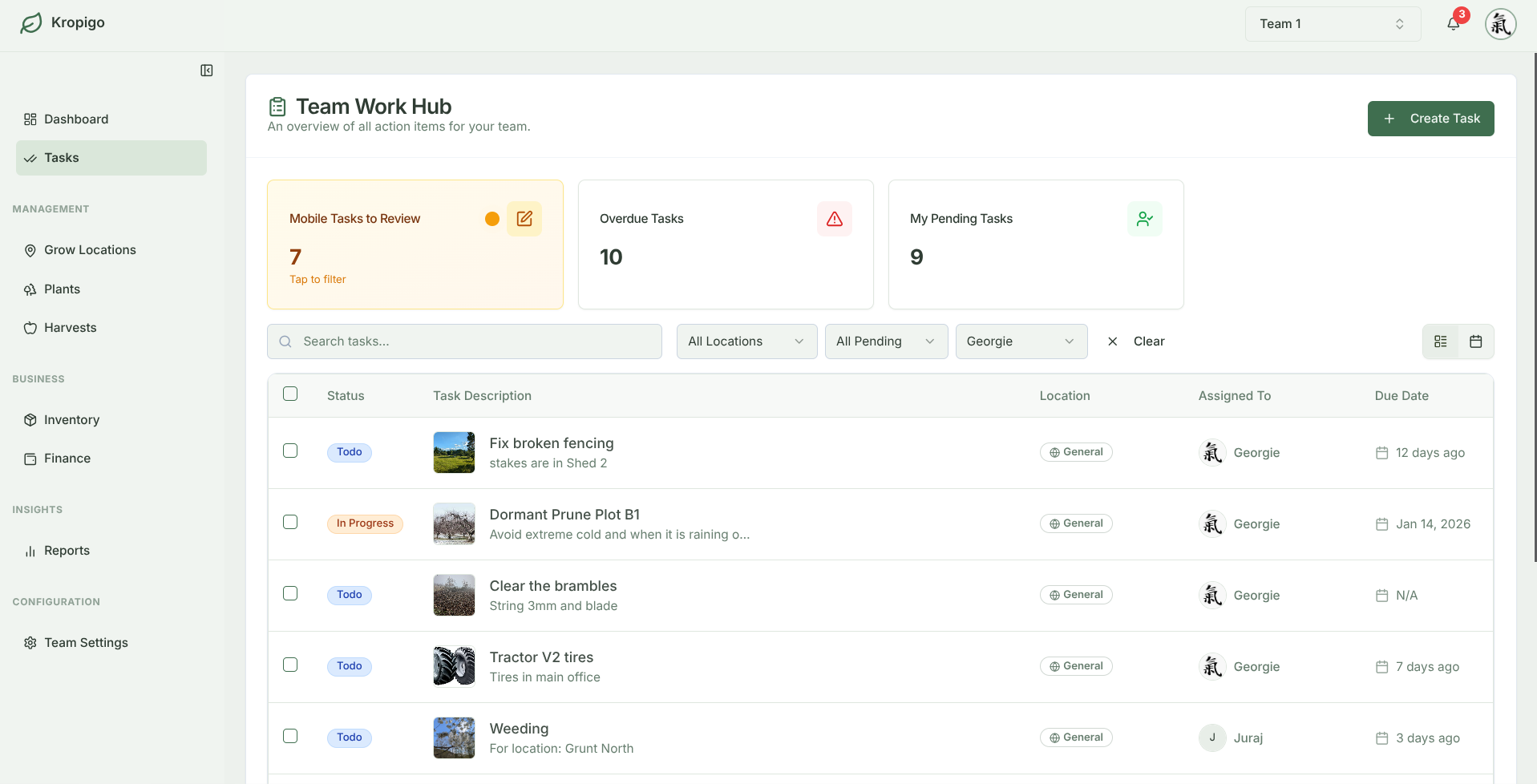
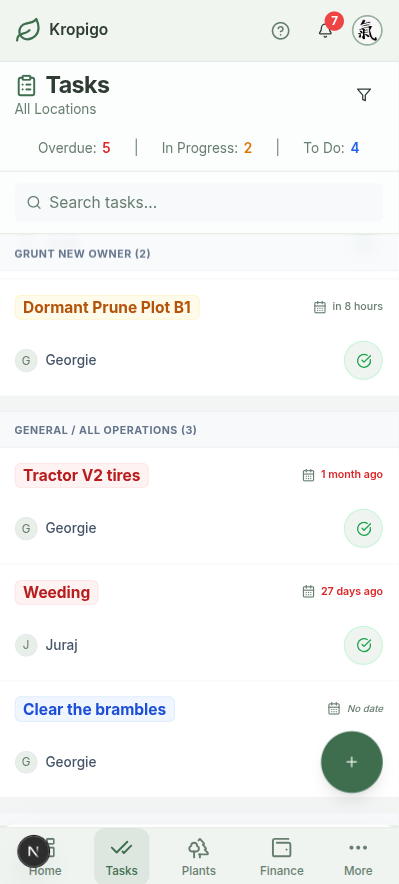
Assign seasonal orchard work to specific blocks and crew members. Field staff check off tasks from their phones with timestamps and notes — with automatic sync when connection drops.
14-day free access · Mobile-optimised for field use · Simple crew invites
Why Text Messages & Whiteboards Break Down
Managing field staff through WhatsApp groups, SMS messages, or morning whiteboard briefings leads to forgotten tasks and unrecorded work.
When a grower needs to verify whether Block 4 was pruned before frost or whether the thinning crew finished the Honeycrisp rows, digging through weeks of text message threads is impossible. Kropigo keeps a dated record of every task, attached directly to the block it was done on.
Lost in Chat Threads
Instructions get buried beneath photos and casual messages. No clear record of completion.
Morning Whiteboard
Stays in the shed. Once crews drive into the orchard, priorities blur and row numbers get mixed up.
Kropigo Mobile Tasks
Clear task lists on crew phones with attached block locations, due dates, and 1-tap check-off.
Built for the Complete Orchard Season
From winter dormant pruning to autumn post-harvest cleanup.
| Stage | What the crew is doing | How it goes in |
|---|---|---|
| Dormant | Winter pruning, brush shredding, replants into the gaps. | Intervention tasks assigned by block or row range, with estimated hours per block. |
| Bud break | Frost watch, irrigation start-up, the first copper. | Inspection tasks at Urgent priority when a frost night is coming. |
| Bloom | Hives in, pollination checks, watching the weather. | Inspection against the block, with a photo on the entry. |
| Post-bloom | Hand thinning and branch tying, in a window that never lands when you planned. | Intervention by row, with the target fruit per cluster written into the task note. |
| Summer | Mowing, orchard floor, summer prune, irrigation checks. | General tasks assigned to whoever owns that round. |
| Pre-harvest | Maturity testing, bins delivered, picking crew briefed. | Inspection tasks due-dated to the week before first pick. |
| Harvest | Picking rounds, block by block. | Tasks checked off on the phone; the fruit itself goes in as a harvest entry. |
| Post-harvest | Post-harvest nutrition, tree guards, machinery serviced before it is put away. | General and Intervention, with actual hours closed out against the estimate. |
Stages rather than months, because the calendar flips with your hemisphere. Tasks do not repeat on their own — at the start of each stage you assign the list again, which is also the moment you find out what the last one actually took.
Dormant & Canopy Pruning
Assign pruning tasks by block or row range. Track crew hours, completed rows, and brush shredding progress across winter months.
- Assign tasks down to a specific block or row
- Record estimated and actual hours per task
Fruit Thinning & Tree Training
Thinning and tying happen in a narrow window after bloom, and never on the day you planned for. Put the target fruit per cluster in the task note so nobody is guessing at the top of a ladder.
- Attach instructions and photos to tasks
- Monitor completion dates against fruit size milestones
Mowing & Orchard Floor Care
Schedule alley mowing, weed strip maintenance, and gopher/rodent management across all plots, with due dates and automatic overdue notifications so nothing quietly slips a fortnight.
- Log hours worked against each task
- Visual status badges: To do, In Progress, Done
Field Crew Collaboration
Invite team members with clear role separation. Contributors see their daily work queue without gaining access to farm accounting or billing data.
- Instant mobile sync across all team phones
- Permanent log of who completed what and when
Whiteboard & SMS vs Generic Task Apps vs Kropigo
| Capability | Whiteboard & SMS | Generic Task Apps (Asana/Trello) | Kropigo |
|---|---|---|---|
| Block & Row Context | Easily forgotten in the field | No concept of orchard blocks or tree rows | Attached directly to block & row |
| Signal Drop Protection | Not applicable | Blank screens & lost updates | Queues locally, syncs on reconnect |
| Role & Privacy Separation | None | Costly per-seat enterprise tiers | Contributors see tasks; finance stays private |
| Setup & Adoption | Zero structure or accountability | Complex Kanban boards & config | Built for field crews with zero training |
| History & Work Logs | Wiped off the board daily | Disorganised comment threads | Permanent record of who did what, and when |
Frequently Asked Questions
What happens if a worker loses signal mid-task?
The check-off is not lost. If signal drops while a worker is completing a task, logging hours, or adding a note, the change is held on their phone and syncs to your dashboard as soon as they reconnect. Kropigo does need a connection to load, so crews should open it before driving out to a block with no coverage — it is not designed for a full day out of range.
How many crew members can I add to my team?
The Essentials plan includes up to 5 team members, and the Pro plan includes up to 15 team members with full multi-role permissions.
Can I review completed task logs for audits?
Yes. Filter completed tasks by date range, block, or worker and review them on screen, with the assigned worker and completion date on every record. On the Pro and Master plans you can download the full task history as CSV or Excel. Note that this is an operational work log — Kropigo does not yet produce a dedicated regulatory spray diary.
Before you switch anything
The rest of the orchard record
Every module hangs off the same blocks and rows, so the records line up instead of living in separate files.
Orchard Record Keeping
The whole picture — tasks, harvests, costs and block history kept as one connected record instead of five separate files.
Orchard Block Management
Structure blocks, rows and tree counts by cultivar, rootstock and planting year, then hang everything else off them.
Orchard Harvest Tracking
Log bins, lugs and weights at the row end, with running yield totals by block and variety as the pick goes on.
Orchard Inventory Management
Keep stock counts, expiry dates and equipment locations honest, with low-stock alerts before a spray window opens.
Orchard Expense Tracking
Log input, labour and machinery costs with the supplier, the category and a photo of the receipt, taken in the field.
Get the Whole Crew on the Same List
Assign tasks with confidence, reduce miscommunication, and keep a clean digital history of every orchard task.