Orchard Expense Tracking
Logged in the Field, Not at Tax Time
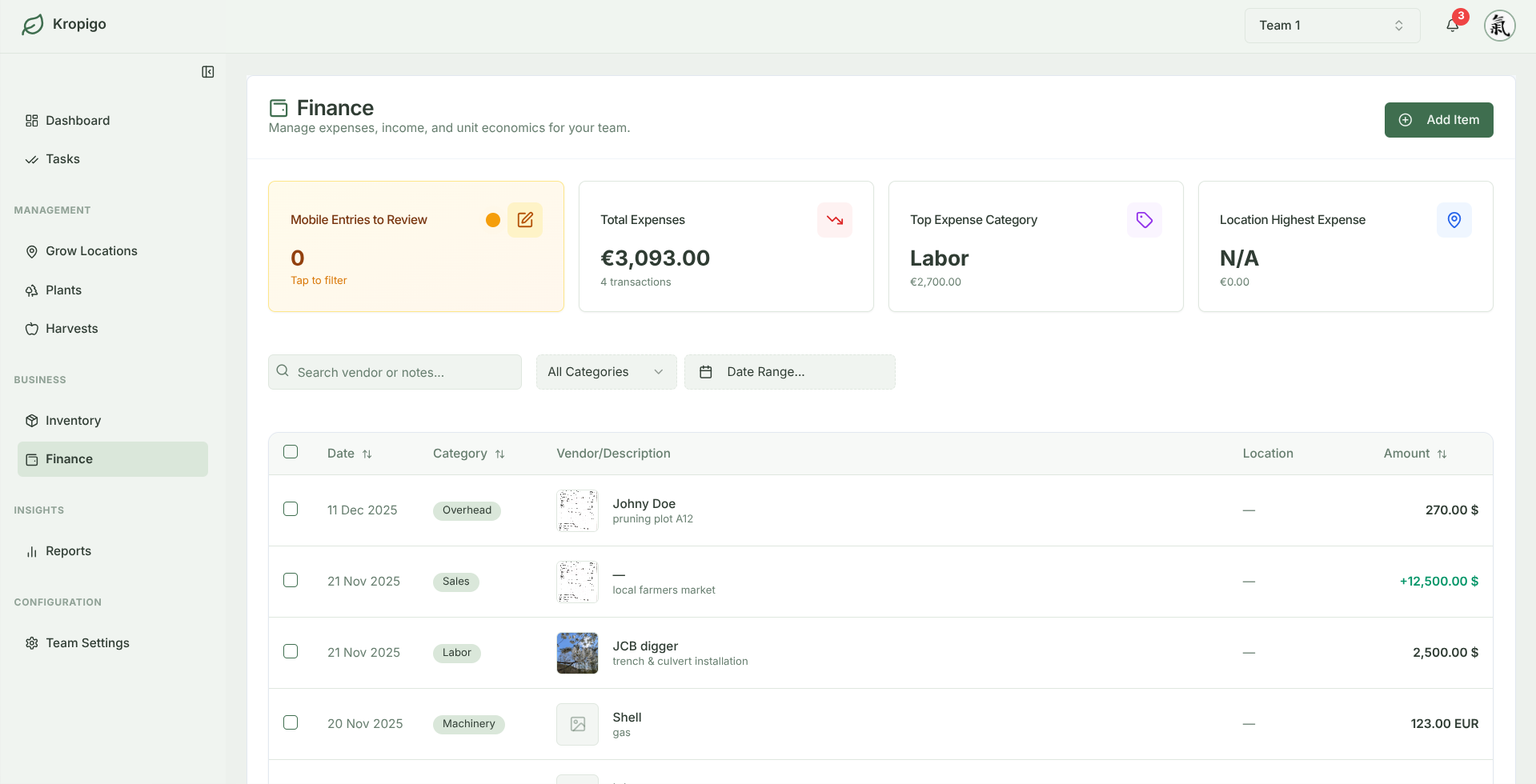
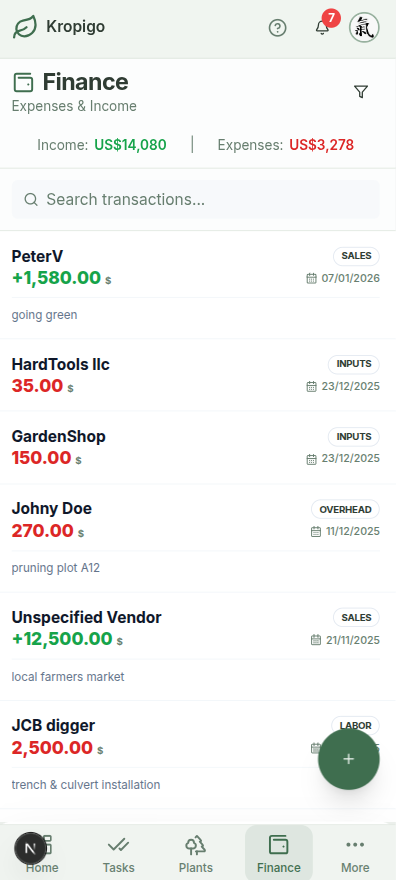
Snap the receipt at the merchant counter, pick the category, name the supplier — and the entry is done before you pull out of the yard. At season's end the year is already categorised and dated instead of sitting in a glovebox.
14-day free access · No credit card required · CSV & Excel export on Pro
What a General Ledger Throws Away
Most orchardists run their books through QuickBooks or Xero. Those tools are built to answer what the business spent and what it owes, and they answer it well. Keep them.
What they are not built to hold is everything you knew standing at the counter: what kind of orchard work the money was for, who you bought it from, which site it was going on, and the receipt itself. That detail gets dropped at the point of entry — usually weeks later, at a desk, off a faded till slip.
Generic Accounting
Records the total and the supplier. What the spend was actually for is not part of the entry.
Shoebox Receipts
Paper receipts accumulate in truck gloveboxes until tax time, losing details on where materials were applied.
Logged While You Remember
Snap the receipt in the field and set the category, supplier and site while the job is still fresh.
Every Entry Carries Its Own Context
One entry holds the amount, the category, the supplier, the date and the receipt photo.
Mobile Receipt Capture
Snap a photo of the fertiliser or irrigation invoice with your phone before leaving the supply merchant. Attach the image, vendor name, and expense category directly to your ledger.
- Encrypted cloud receipt storage
- Receipt photo is protected if signal drops
Categorised the Way an Orchard Spends
Five expense categories that match real orchard work, your own supplier list pulled from Contacts, and a paid-or-pending marker on every entry. Labour, machinery and income entries also carry the grow location they belong to. Bought something that covers more than one job? Split the invoice into one entry per job as you log it.
- Inputs, labour, machinery & fuel, infrastructure, overhead
- Labour, machinery and income entries carry a grow location
Spend and Harvest in One System
Your season's costs and your season's bins live in the same records instead of a shoebox and a spreadsheet — so both halves of the cost-per-kilo question are finally in one place. Being straight with you: Kropigo does not add them up for you yet. Per-block and per-kilo roll-ups are on the roadmap; what you get today is clean, dated, categorised data for when they land.
- Income logged alongside expenses, not separately
- Per-block and per-kilo roll-ups are roadmap, not shipped
A Ledger You Can Sit Down With
Come tax time, the year is already categorised, dated, and attached to a supplier — with the receipt photo on the entry. Narrow the ledger down in the dashboard, then download the lot as CSV or Excel on the Pro and Master plans to send straight to your accountant.
- Pull up every entry still missing its receipt
- Filter by month or year to date; search supplier and notes
- Download your complete ledger as CSV or Excel
An Expense Can Also Put the Stock on the Shelf
Most setups record a purchase twice — once as a cost, once as stock — or record the cost and forget the stock entirely. In Kropigo an expense can carry the inventory item it bought and the quantity it added, so the entry that logs the spend also updates the shed. One trip to the merchant, one entry.
- The receipt photo stays with the purchase
- Stock is stored in your designated shed or bay
- See how inventory tracking works
General Accounting vs Paper Receipts vs Kropigo
| Capability | General Accounting (Xero/QBO) | Paper & Glovebox Receipts | Kropigo |
|---|---|---|---|
| Orchard Context on the Entry | Invoice total and supplier, nothing more | Lost or forgotten by tax time | Category, supplier, site and receipt photo |
| Mobile Receipt Capture | Separate scanner app / office entry | Faded thermal paper in truck | Phone camera snap in the field |
| Stock & Inventory Link | Requires complex manual journals | Completely separate notebook | Purchase can put stock on the shelf |
| Multi-Crew Permissions | All-or-nothing ledger access | No role separation | Contributors log tasks; finance stays private |
| Accountant Export | Standard accounting reports | Hours of manual typing | Clean CSV & Excel export (Pro/Master) |
Frequently Asked Questions
Does this replace my accountant or QuickBooks?
No. Kropigo keeps the operational detail your books throw away — what the spend was for, who supplied it, which site it went on, and the receipt itself. Keep using QuickBooks or Xero for your accounts; use Kropigo to know what the money was actually spent on, and export a CSV or Excel file to hand your bookkeeper (Pro and Master plans).
Can crew members see farm financial records?
No. Access to expense ledgers, invoices, and financial reports is restricted to Managers and Owners. Crew members with Contributor roles only see field task assignments and harvest logs.
Can I track labour costs by block?
By site, yes. By individual block, not yet — and we would rather tell you than let you find out after signing up. Log contractor invoices, pruning wages and seasonal labour under the Labour category, and each entry carries the grow location it belongs to, so a grower running more than one site can see which one the labour went to. Attribution down to a single block or row is on the roadmap. Until then, growers note the block on the entry and split one invoice into separate entries per job.
Before you switch anything
The rest of the orchard record
Every module hangs off the same blocks and rows, so the records line up instead of living in separate files.
Orchard Record Keeping
The whole picture — tasks, harvests, costs and block history kept as one connected record instead of five separate files.
Orchard Task Management
Assign pruning, thinning, mowing and spraying to a crew, and get the work logged back from a phone in the rows.
Orchard Block Management
Structure blocks, rows and tree counts by cultivar, rootstock and planting year, then hang everything else off them.
Orchard Harvest Tracking
Log bins, lugs and weights at the row end, with running yield totals by block and variety as the pick goes on.
Orchard Inventory Management
Keep stock counts, expiry dates and equipment locations honest, with low-stock alerts before a spray window opens.
Know What the Season Actually Cost
Log the receipt at the merchant counter instead of hunting for it at tax time.