Track Fruit Harvest
by Block, Variety & Bin
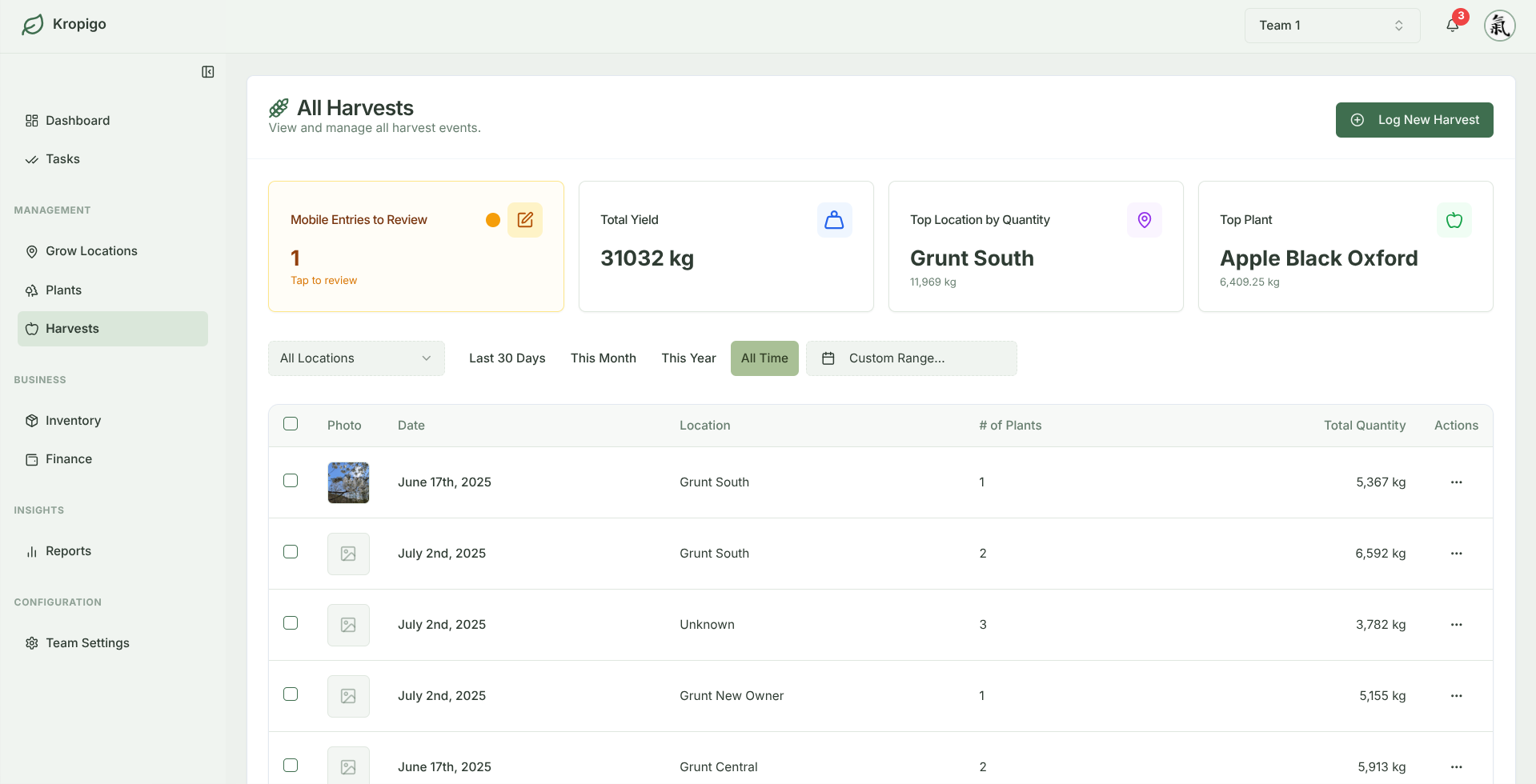
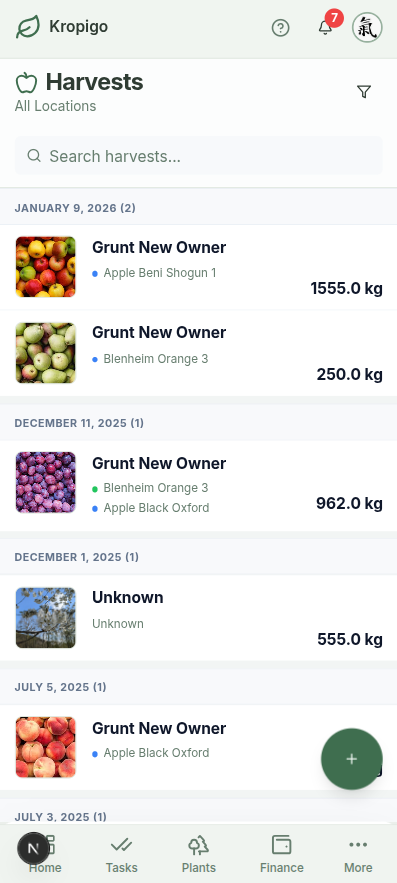
Eliminate missing bin tags and disorganised picking tally sheets. Record fruit weights, bin counts, and picker crews directly from your phone in the row — with automatic queue and sync when connection drops.
Protects entries during signal drops · No credit card required
What Goes Wrong Between the Row and the Packhouse
Lost Bin Tallies
Wet hands, mud, and wind destroy paper bin tags. Discrepancies between field picking counts and packhouse arrivals cost money every single day.
Blended Block Numbers
When bins from Block 3 and Block 5 get lumped together during truck loading, you lose all visibility into which cultivar or rootstock actually performed best.
Late Evening Reconciliations
Pick totals scribbled on paper notebooks require hours of manual tallying and cross-checking at midnight after a 12-hour day in the orchard.
From First Pick to Final Packout
Logging fast enough to keep up when the bins are stacking up.
Fast Bin & Weight Logging
Record bin counts, quantity in your own unit, a quality grade, and the storage location the fruit went to — in seconds, with minimal tapping.
- Grades: Premium/A, Standard/B, Processing/Juice, Cull
- Log per tree or as one bulk total for the block
Block & Variety Attribution
Every harvest log links permanently to a specific block, planting year and cultivar, and the season view shows your top variety by weight. Comparing two rootstocks side by side is on the roadmap — today you would read the block totals and do that comparison yourself.
- Harvests linked to block, row and individual trees
- Season-by-season history kept per block
Crew Attribution on Every Pick
Record the crew leader and who harvested against each entry, so a bin count always traces back to a date, a block, and the people who picked it — instead of an unlabelled tally sheet.
- Crew leader and harvested-by on each record
- Every entry timestamped and attributed
Season Totals as You Go
Watch the season build up entry by entry instead of adding it all up in December. Filter the harvest log by block, cultivar, date range, or grade to see where the fruit actually came from.
- Running totals across the harvest log
- Record an estimated yield to compare against
From Harvest Bins to Block Margins
Harvest totals are only half the picture without input costs. Because Kropigo tracks both harvests and expenses against the exact same blocks, you have full multi-season clarity on what each block yielded alongside what it cost to grow.
Track Inputs by Block
Log fertiliser, pruning labour, fuel, and spray costs directly to the blocks you harvest.
Free Harvest Spreadsheet
Need a free Excel model first? Download our 6-sheet harvest tracking workbook with automatic bin-to-kg conversion.
Paper Bin Slips vs Generic Spreadsheets vs Kropigo
| Capability | Paper Bin Slips | Generic Spreadsheets | Kropigo |
|---|---|---|---|
| Row-Side Field Entry | Muddy, easily lost | Clunky on mobile in the row | Fast mobile logging |
| Signal Drop Protection | Not applicable | Sync conflicts & overwrites | Queues locally, syncs on reconnect |
| Block & Cultivar Attribution | Manual cross-reference | Prone to broken lookups | Permanent link to block & tree records |
| Crew Leader Attribution | Unverified handwriting | Shared cell collisions | Timestamped crew attribution |
| Export & Analysis | Hours of manual typing | Already in sheet | Clean CSV & Excel export (Pro/Master) |
Frequently Asked Questions
Can I track harvest by bins or by kilograms?
Both. Log a bin count, a quantity, or both on the same entry — bin counts have their own field. The quantity unit is picked on the entry itself from kg, lbs, crates, boxes, bunches or litres, so the numbers match how your packhouse already talks about the crop.
Can supervisors log bins for multiple picking teams simultaneously?
Yes. Supervisors can switch between blocks and crew leaders as they go, logging entries from the row while tractors load trailers. Each entry records its own block, crew and time, so parallel teams stay separated in the log.
Does harvest tracking connect with the orchard planner?
Not automatically — there is no import from the planner into your account, and we would rather say so. What you can do is put an estimated yield on a harvest record yourself, and the projection from our free Commercial Orchard Planner is a sensible figure to start from. The log then holds your estimate next to what actually came off the block. Kropigo does not work out the variance for you.
Can I export harvest logs for my packhouse or accountant?
Yes. On Pro and Master plans, you can export all harvest records — including block names, cultivar, date, bin counts, scale weights, grade, and crew attribution — cleanly to CSV or Excel (.xlsx) files anytime.
Before you switch anything
The rest of the orchard record
Every module hangs off the same blocks and rows, so the records line up instead of living in separate files.
Orchard Record Keeping
The whole picture — tasks, harvests, costs and block history kept as one connected record instead of five separate files.
Orchard Task Management
Assign pruning, thinning, mowing and spraying to a crew, and get the work logged back from a phone in the rows.
Orchard Block Management
Structure blocks, rows and tree counts by cultivar, rootstock and planting year, then hang everything else off them.
Orchard Inventory Management
Keep stock counts, expiry dates and equipment locations honest, with low-stock alerts before a spray window opens.
Orchard Expense Tracking
Log input, labour and machinery costs with the supplier, the category and a photo of the receipt, taken in the field.
Take Control of Your Harvest Numbers
Log bins, verify yields by block, and eliminate harvest stress. Start your free trial today.