Orchard Inventory Management
Consumables and Equipment
Know what is actually on the shelf before you drive to town — and which sprayer is still broken. Two kinds of stock, tracked the two different ways they actually behave.
No credit card required · Field crew can adjust stock · Bulk import from Excel
Three Ways a Shed Costs You Money
Running Dry Mid-Block
The tank is filled, the tractor is out, and there is not enough product to finish the block. The job stops, the weather window closes, and someone drives an hour for one drum.
The Drum That Expired
A part-used container sits at the back of the shelf through winter. Nobody knows what is in it, when it was bought, or whether it is still good — so it gets replaced rather than risked.
The Kit Nobody Logged
A pump failed in August and went back on the rack. It is found the following spring, on the morning it was needed, by someone who was not there when it broke.
Consumables Run Out. Equipment Wears Out.
Generic inventory apps treat every line the same. A drum of fertiliser and a mist blower need watching for completely different reasons, so Kropigo tracks them differently.
Consumables — Tracked to a Threshold
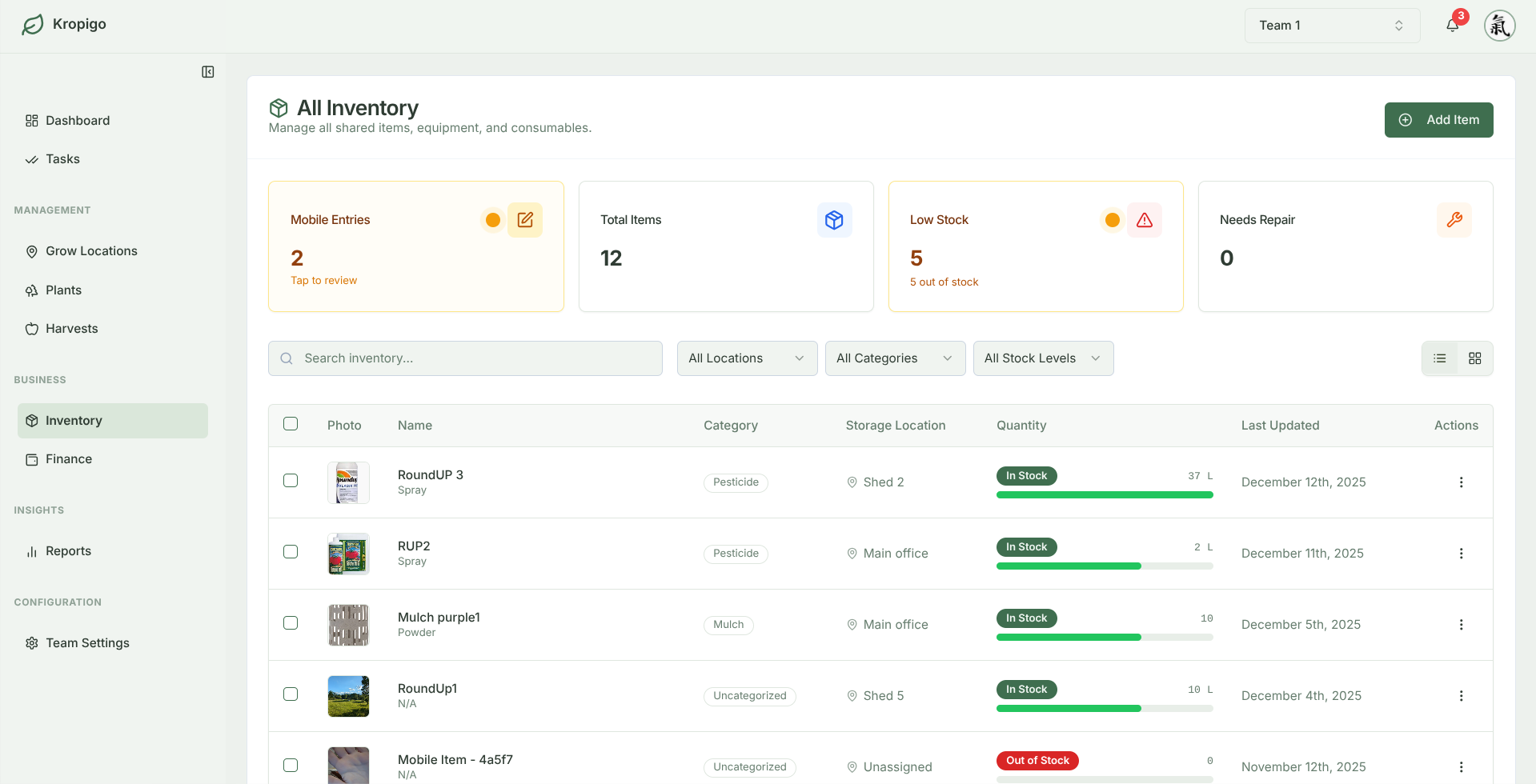
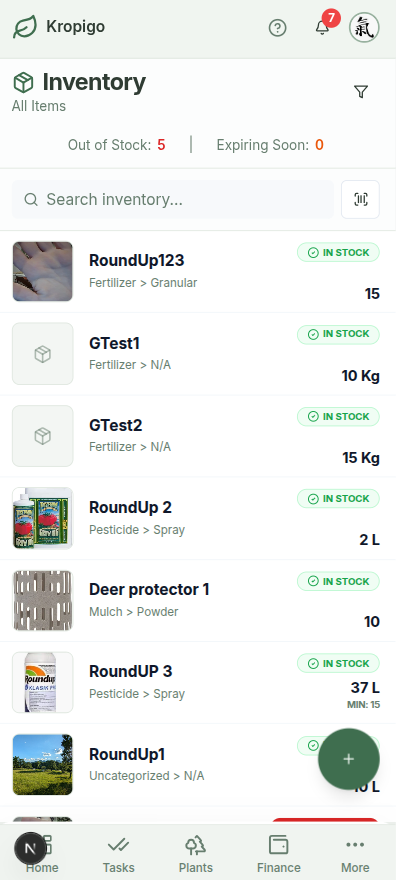
Fertiliser, crop protection, fuel, packaging, twine, netting, bait — anything that depletes. Set a minimum for each one and Kropigo watches the level as stock moves, so "are we low on that?" stops being a question anyone has to walk to the shed to answer.
- Minimum threshold per item, in your own units
- Purchase date, cost and supplier on every batch
- Safety data sheet link and batch number on the item
Equipment — Tracked to a Condition
Sprayers, pumps, mowers, bin trailers, hand tools. Equipment does not run down to a threshold, so it carries a condition instead — and anything marked as needing repair stays visible until somebody deals with it, rather than being rediscovered the morning it is needed.
- Serial number and model recorded per unit
- Condition set when it is checked in or out
- A needs-repair count you can see at a glance
Alerts That Reach You, Not a Badge You Miss
When stock crosses its minimum — or hits zero — Kropigo raises a notification, not just a colour on a screen nobody opened. Items with a batch approaching its expiry date are flagged separately, so product gets used in time instead of written off.
- Separate low-stock and out-of-stock notifications
- Expiring-soon flagged on the item
- Low stock surfaced on the dashboard, not buried
Stock Held Per Store, Not Per Farm
A total is no use when the drum is in the wrong shed. Define your physical storage locations — whether a chemical cabinet in the orchard, the main shed, or an off-site workshop 5 km away — so the count you check is where the product actually sits. Move items between stores in bulk as seasonal demands shift.
- Define your own storage locations
- Bulk-move items between stores
- Adjust stock from a phone, in the shed
Buy It Once, Record It Once
In most setups a purchase gets entered twice — once as a cost, once as stock — or, more often, once as a cost and never as stock. Kropigo logs an expense against the inventory item it bought, so the same entry that records the spend also puts the product on the shelf.
Snap the invoice at the merchant, attach it to the item, and the drum is in the shed record before you are back in the ute.
One entry
An expense can carry the item it bought and the quantity it added.
Receipt attached
The photo lives on the expense, so the paper trail follows the stock.
Storage location
Places the purchased stock straight into the right shed, bay, or cabinet.
Clipboard vs Generic Inventory App vs Kropigo
| Capability | Clipboard / spreadsheet | Generic inventory app | Kropigo |
|---|---|---|---|
| Consumables vs equipment | One undifferentiated list | Same fields for both | Threshold vs condition |
| Expiry dates | Only if someone writes them | Rarely modelled | Per batch, flagged when close |
| Stock per store | A single number, if any | Usually supported | Per storage location, with bulk move |
| Linked to farm costs | Separate book entirely | Needs an integration | One expense records both |
| Crew can update it | Only who holds the clipboard | Often a paid seat each | Contributors adjust stock |
Prefer starting with a spreadsheet? Download our free Orchard Inventory Spreadsheet (.xlsx) with built-in stock threshold alerts and equipment registers.
Frequently Asked Questions
Can my crew update stock, or only the office?
Crew can. Team members with the Contributor role can adjust stock levels from their phone in the shed — unlike financial records, which stay restricted to Managers and Owners. Whoever takes the last drum is the person best placed to say so.
Does it keep a spray application record?
Not yet, and stock is not deducted automatically when you spray — you adjust it yourself. Kropigo holds the chemical store side: what is on the shelf, its batch number, its expiry, and a link to its safety data sheet. For the application record itself there is a free spray diary spreadsheet that works out re-entry and pre-harvest intervals.
Can I load my existing stock list in one go?
Yes. Upload an Excel file (.xlsx or .xls) with item name, type, category, unit, minimum threshold, opening quantity and storage location, and Kropigo creates the records in bulk. Download the template from Settings so the column headers match.
The rest of the orchard record
Every module hangs off the same blocks and rows, so the records line up instead of living in separate files.
Orchard Record Keeping
The whole picture — tasks, harvests, costs and block history kept as one connected record instead of five separate files.
Orchard Task Management
Assign pruning, thinning, mowing and spraying to a crew, and get the work logged back from a phone in the rows.
Orchard Block Management
Structure blocks, rows and tree counts by cultivar, rootstock and planting year, then hang everything else off them.
Orchard Harvest Tracking
Log bins, lugs and weights at the row end, with running yield totals by block and variety as the pick goes on.
Orchard Expense Tracking
Log input, labour and machinery costs with the supplier, the category and a photo of the receipt, taken in the field.
Stop Guessing What Is in the Shed
Get the store on record once, and keep it there — with the crew who use it able to keep it honest. Zero setup fees, cancel anytime.